RAG Design Patterns (Chunking, Retrieval, Ranking)
Introduction
Retrieval-augmented generation (RAG) connects an LLM to your data: embed documents, search by similarity, inject the best passages into the prompt. Quality rarely comes from one trick. The patterns below are orthogonal knobs — chunking shapes what gets embedded; re-ranking fixes what vectors miss; query expansion helps vague user input. This page condenses twenty-two patterns, three common combinations, and mistakes that show up in real systems — with concrete scenarios that are illustrative, not tied to a single vendor write-up.
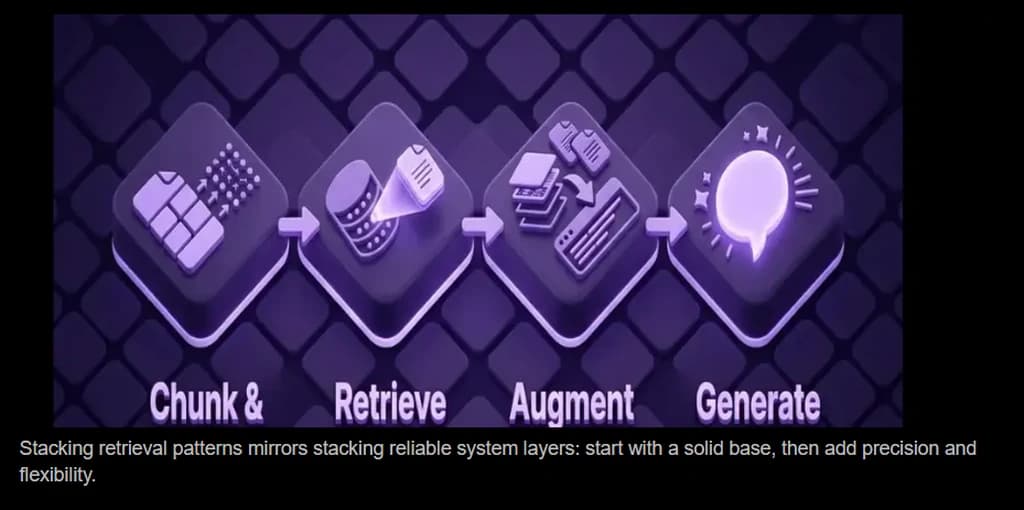
Chunking Patterns
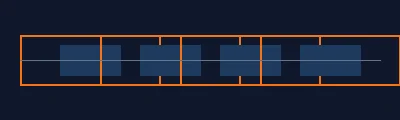
Fixed-size chunking
Splits the raw text on a fixed window—usually max tokens or max characters per chunk—using a sliding window down the file. The next window starts after a fixed stride when overlap is zero. Cuts happen where the counter lands, not necessarily at paragraphs, headings, or list items.
What it does: Splits the raw text on a fixed window—usually max tokens or max characters per chunk—using a sliding window down the file. With overlap set to zero, the next window abuts the previous one on a fixed stride (often chunk_size). Cuts happen where the counter lands, not necessarily at paragraphs, headings, or list items.
When to use it: Quick baselines, uniform logs, or when you do not yet have a reliable structure parser. Pair with measurement before investing in heavier chunking.
Pros: Trivial to implement, fast ingest, predictable chunk counts, no extra parser for document structure.
Cons: You often slice through sentences, tables, and topic boundaries, so one vector can mix unrelated ideas; retrieval gets noisier than structure-aware splits unless the document is uniform.
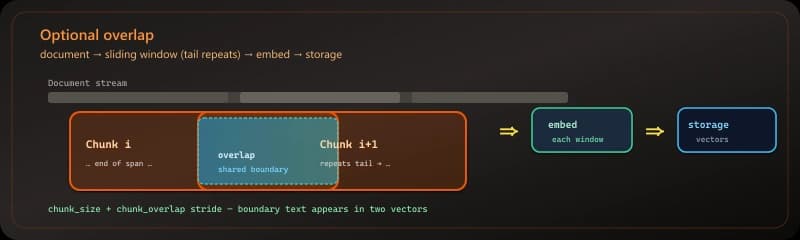
Optional overlap
Each new chunk repeats the last N tokens or characters of the previous chunk (chunk_overlap), so vectors near a boundary still carry a thin slice of shared context across the cut—unlike a hard abutting split.
What it does: Uses the same splitter as fixed-size chunking with chunk_overlap > 0 so each chunk repeats the tail of the previous chunk; both sides of a boundary appear in at least one vector with shared context.
When to use it: When facts or steps often sit on a cut line, or when retrieval queries are short and could match either side of a boundary.
Pros: Fewer orphan edges at window boundaries; modest overlap is a cheap recall bump on uniform corpora.
Cons: More tokens indexed and embedded; large overlap inflates storage and duplicate hits—tune against chunk_size and measured retrieval quality.
Metadata per chunk
Stores structured fields with each chunk—source path, page or offset, section or heading, product, tenant, ACL, version, timestamps—so retrieval can filter, cite, and audit; the embedding vector alone does not carry provenance.
What it does: Persists a metadata dict (or column set) next to each chunk’s text in your index so filters, citations, and access control use fields you control, not only cosine similarity to the body text.
When to use it: Multi-tenant corpora, compliance, “which doc/page is this?”, or when you must exclude sources by ACL, date, or product line at query time.
Pros: Cheap to add at ingest; most vector stores expose metadata filters; answers can show footnotes (source, page) without extra round trips.
Cons: Schema drift if every team invents keys; large or blob metadata bloats the index; keep payloads small and normalize names (e.g. source, page, section).
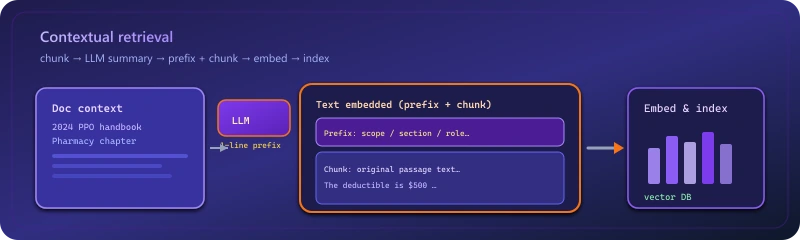
Contextual retrieval
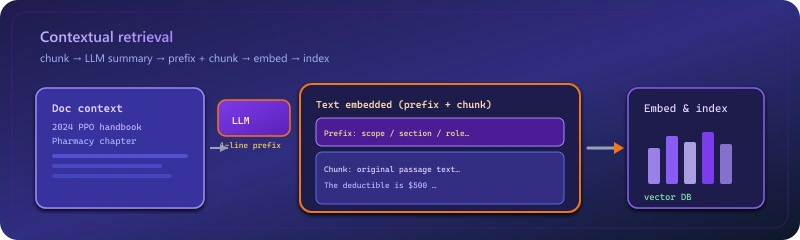
Prepends short document-level context to each chunk before embedding so similar-looking snippets stay distinguishable (policy year, product, jurisdiction).
What it does: Prepends short document-level context to each chunk before embedding — often one or two sentences produced by an LLM describing how the chunk fits the whole file.
When to use it: High-stakes corpora (legal, clinical, financial) where a snippet alone is ambiguous without “which policy / year / jurisdiction.”
Example: A chunk that only says “the deductible is $500” gets prefixed with “From the 2024 PPO member handbook, pharmacy benefits chapter,” so similarity search distinguishes it from the same sentence in a dental addendum.
Pros: Anthropic’s published evaluation shows a sizeable reduction in retrieval misses compared to unstuffed chunks, because each block carries enough framing to read well on its own. The enriched string still indexes cleanly for dense vectors, lexical search, or a hybrid of the two.
Cons: One LLM call per chunk at ingest (e.g. Hugging Face Inference quotas or paid endpoints); local embedding models still cost disk and CPU; stored strings are longer than raw slices, so the index uses more space and I/O.
Context-Aware Chunking (Semantic)
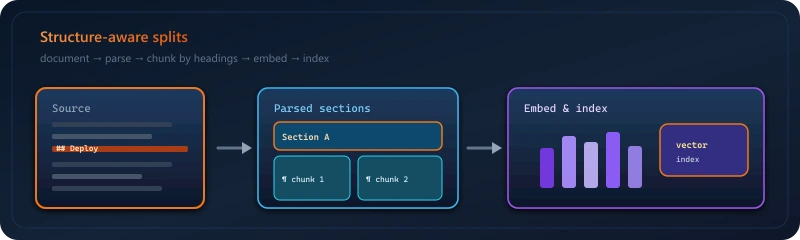
Context-aware chunking splits documents at places where the meaning changes (usually by comparing embeddings of neighboring sentences or spans), so each chunk stays on one topic instead of being cut at a fixed size.
What it does: The sketch below wires SemanticChunker to HuggingFaceEmbeddings(model_name="sentence-transformers/all-MiniLM-L6-v2"). It embeds sentences, scores consecutive gaps, and splits where the gap exceeds the rule set by breakpoint_threshold_type="percentile" and breakpoint_threshold_amount (e.g. 95).
When to use it: Plain prose or messy extractions with no reliable headings; use when you accept embed-time cost to avoid blind character cuts.
Pros: Matches the stack many teams already use for retrieval (same Hugging Face / sentence-transformers ecosystem); create_documents returns LangChain documents ready for downstream loaders; lowering the percentile amount usually yields more chunks, raising it fewer.
Cons: Pulls sentence-transformers (and typically PyTorch) locally; very short inputs give unstable distance stats; clean extracted text before embedding if the source is PDF or HTML.
Layout-aware chunking
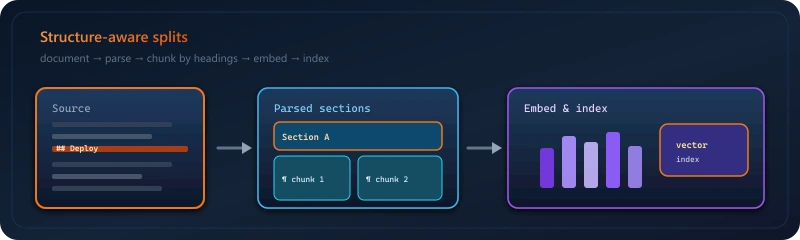
Builds chunks from the document’s visual and logical structure—pages, blocks, tables, lists, reading order—usually after a PDF/DOCX/HTML parser (Unstructured, Docling, cloud OCR, etc.), not from a single flattened string. Differs from context-aware (semantic) chunking: semantic splits use embedding distance between neighboring spans to find topic boundaries; layout-aware splits use structure so multi-column pages, tables, and figures do not get merged or sliced blindly. You can combine them: layout blocks first, then semantic chunking inside a long section.
What it does: Uses a layout-aware parser so chunks align with pages, blocks, tables, lists, and reading order—before you embed—instead of flattening the file to one string and splitting blindly. Typical stacks: Unstructured, Docling, vendor OCR, or native DOCX structure APIs.
Vs context-aware (semantic): Semantic chunking finds cuts where meaning shifts (embedding distance between neighboring spans). Layout-aware finds cuts where structure shifts (new block, table cell, column). A two-column PDF may look like one topic to an embedder but two streams to a layout model; a long uniform section may need semantic splitting after layout blocks exist.
When to use it: PDFs, scans, forms, slide decks, and anything with tables or columns where plain text extraction lies about order.
Pros: Fewer absurd merges (caption + unrelated sidebar); tables stay coherent; page numbers and block types can land in metadata for free.
Cons: Parser quality dominates; heavy PDFs cost CPU or API fees; exotic layouts still confuse any engine.
Hierarchy (child/parent)
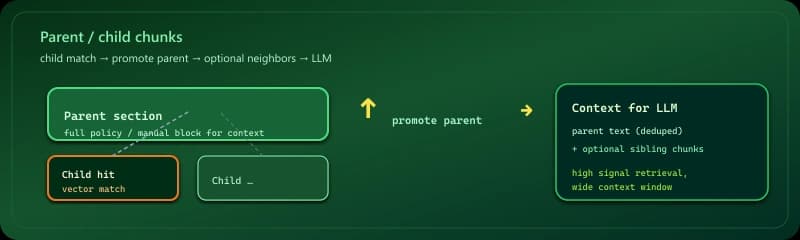
Indexes text at two levels: small child chunks for precise vector hits, each linked to a parent block (section, heading, or page span) you promote when building context. That is a structural layout and metadata graph—not a different pooling rule inside the encoder. Late chunking (below) instead runs one long forward pass and derives chunk vectors from token states conditioned on the whole window; hierarchy does not require that pass, but you must parse or segment the document into parent/child units and keep IDs consistent.
What it does: You segment the document into child units (paragraphs, windows, or leaves) and attach each to a parent unit (section, heading block, page span). You embed and search children for precision; when a child hits, you load the parent text (and optionally siblings) for the LLM. That is structure and IDs in your index—not a different pooling inside the encoder.
Vs late chunking: Late chunking runs one forward pass over a long window and builds chunk vectors from token states that see the whole window. Hierarchy does not require that: child and parent are separate stored strings; you improve recall and context by how you link and fetch levels, not by global pooling in a single encode. You can combine both (e.g. late-encode each child vector while still storing parent_id for promotion).
When to use it: Manuals, policies, and long pages with a real outline—when the best match is a sentence but the model needs the surrounding section to answer safely.
Pros: Cheap to reason about; most vector stores support metadata; citations can point to child span and parent heading. Pairs well with fixed or semantic children.
Cons: Ingest must keep parent/child IDs consistent when content moves; bad splits (parent too huge, child too tiny) waste tokens or miss signal.
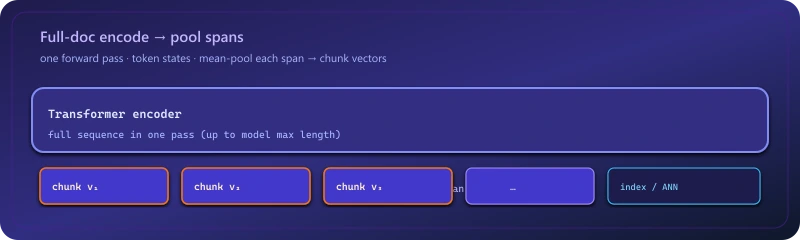
Late chunking
Runs long text through the encoder once, then pools spans so chunk vectors are conditioned on full-document context—strong when local clauses depend on distant sections. Differs from hierarchy (child/parent): late chunking fixes vectors using global token states in that pass; hierarchy fixes retrieval using linked structural units, without requiring a full-document encode per span.
What it does: Runs a long document through the transformer first, then forms chunk vectors from token embeddings (or pooled spans) so each chunk’s representation is conditioned on full document context — not independent encodings of text slices.
When to use it: Dense contracts and specs where local text is meaningless without global document state.
Example: A clause references “the termination provision in Section 9”; late chunking keeps cross-references coherent better than embedding Section 12 in isolation.
Pros: Representations for each span are built after the model has seen the full sequence, so cross-sentence cues inform every chunk vector — not independent encodes of slices. Works best when your encoder can ingest long inputs in one forward pass. Chunk meaning tends to track document-level semantics more closely than naive per-slice embedding.
Cons: You depend on a stack with enough context length and VRAM to run whole documents (or large windows), and on correct pooling over token states — more moving parts than “split text, call embed.” Anything beyond the model’s max tokens still needs chunking or truncation at the document level, so the approach is bounded by that hard limit.
Ranking
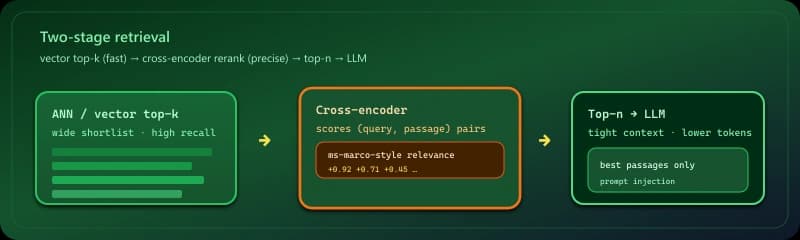
Re-ranking
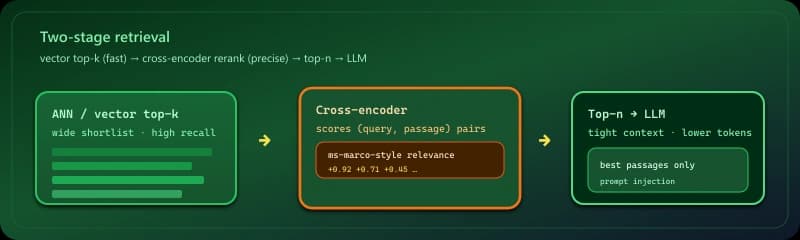
Two-stage retrieval: fast ANN returns a wide shortlist, then a cross-encoder or reranker scores query–passage pairs for precision before generation.
What it does: Two-stage retrieval: a fast vector index returns a wide set (often tens of candidates), then a cross-encoder or dedicated reranker scores query–passage pairs for precision.
When to use it: When wrong context is costly — support bots, compliance Q&A, anything where “close in cosine space” is not the same as “answers the question.”
Example: “Refund SLA for enterprise tier” pulls 40 chunks from a knowledge base; the reranker promotes the paragraph that names “Enterprise” and “72 hours” over a generic returns page that happened to share vocabulary.
Pros: The second stage scores actual query–passage pairs, so relevance usually beats cosine ranking alone. You can retrieve a broad shortlist from ANN yet only hand the model a tight handful of passages. When embeddings pick the wrong neighbor, a cross-encoder or reranker often corrects the order before generation.
Cons: End-to-end latency exceeds ANN-only retrieval because every candidate pair gets a heavier scoring pass. That extra forward pass means more CPU or GPU time and a higher per-query bill than pure vector search at the same candidate count.
Query
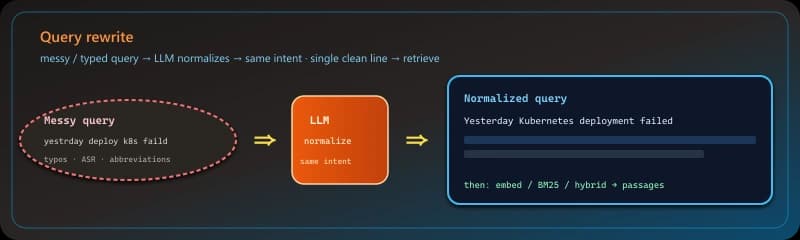
Query rewrite
Uses an LLM to normalize the user’s text—grammar, obvious abbreviations, clearer wording—before search while keeping the same intent, without deliberately widening the topic the way expansion does.
What it does: Sends the user’s raw string through an LLM with a “same intent, clearer surface form” brief—fixing typos, grammar, and obvious shorthand—so the query you embed or send to BM25 matches indexer tokenization without adding new angles the user did not ask for.
When to use it: Voice-to-text, mobile typos, mixed-language queries, or internal abbreviations that your docs spell out fully; also when expansion would over-steer a query that is already specific.
Example: “yestrday deploy k8s faild” becomes “Yesterday Kubernetes deployment failed” so vector search lines up with runbook wording instead of noisy token fragments.
Pros: One short LLM call can lift recall on messy input without bloating the query with extra concepts. Easier to reason about than expansion when you want deterministic intent.
Cons: Still costs latency and tokens; a bad rewrite can drop domain terms the user actually meant—keep prompts tight and log before/after pairs for regressions.
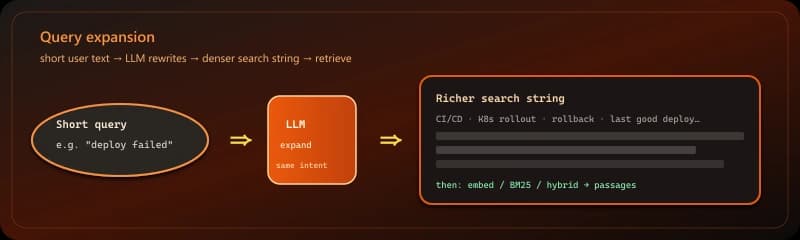
Query expansion
Uses an LLM to turn short or vague user text into richer phrasing before embedding or keyword search so retrieval matches how your corpus is written.
What it does: Turns a short user query into a richer phrasing (or multiple sub-questions) using an LLM before embedding or keyword search.
When to use it: Chat UIs where people type “it’s broken” or “billing” — one-word or ambiguous inputs that match poorly in embedding space.
Example: “deploy failed” becomes “CI/CD pipeline error, Kubernetes rollout, rollback steps, last successful deployment” so retrieval targets ops runbooks instead of generic “failure” pages.
Pros: Rewritten queries tend to align better with how your corpus is phrased, so hits are less random for underspecified input. A single enriched string keeps the retrieval step straightforward compared with running several variants in parallel.
Cons: You add one LLM hop before search, so time-to-first-hit grows versus passing the raw string straight to the index. Over-expansion can steer an already-clear question toward the wrong subtopic, and you pay extra tokens on every query.
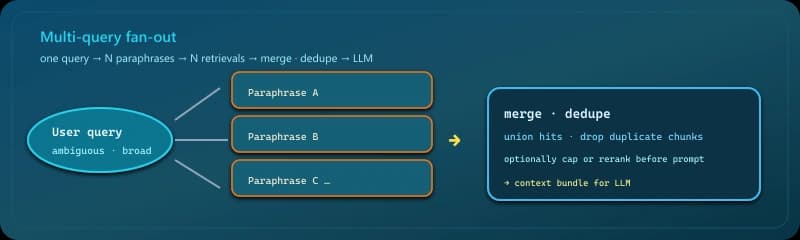
Multi-query RAG
Generates several paraphrases, runs retrieval for each, then merges and deduplicates so ambiguous questions explore multiple interpretations in parallel.
What it does: Generates several paraphrases of the same question, runs retrieval for each, then merges and deduplicates results.
When to use it: Broad or underspecified questions that admit multiple interpretations (“performance” could mean latency, throughput, or cost).
Example: For “Python async,” one query stresses asyncio event loops, another aiohttp I/O, a third migration from threads — unioning hits covers users who meant different docs.
Pros: Ambiguous wording is less of a dead end: if one phrasing misses the right doc, another may still hit it. You deliberately sample different angles on the same information need. Fan-out lookups can run in parallel so end-to-end latency stays closer to a single search than four sequential ones.
Cons: Every variant triggers its own retrieval call, so vector DB and embed traffic scale with how many lines you generate — plus the LLM cost to produce them. Even after deduping, overlapping passages from multiple queries can bloat the candidate set before merge.
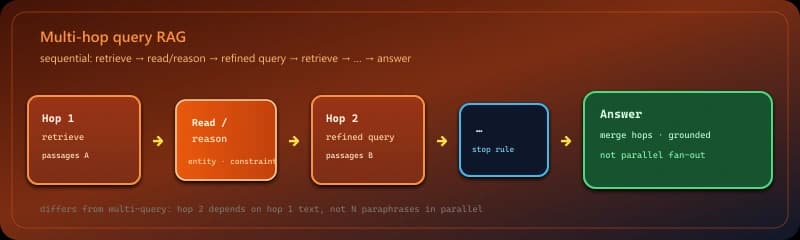
Multi-hop query RAG
Chains several retrieve → read/reason → retrieve steps instead of one search, because the answer spans multiple facts or the next query depends on what the first hop returned.
What it does: Does not stop at one retrieval: it chains retrieve → read or reason → retrieve again when the answer is not in one chunk or one search. Later hops use entities, constraints, or sub-questions surfaced by earlier passages.
When to use it: Compositional questions (bridge two documents), follow references (“the plan mentioned on the pricing page”), or relational facts that vector similarity does not join in a single hop.
Example: First hop finds “Enterprise” tier name; second hop searches refund policy for that tier by name; a single embedding of the original long question might miss both.
Pros: Handles information needs that multi-query (parallel phrasings of the same question) still cannot solve, because hop two genuinely depends on hop one’s text.
Cons: Latency and cost scale with hops; an early wrong passage poisons later queries; needs a stop rule and often citations per hop for debugging.
Extended patterns
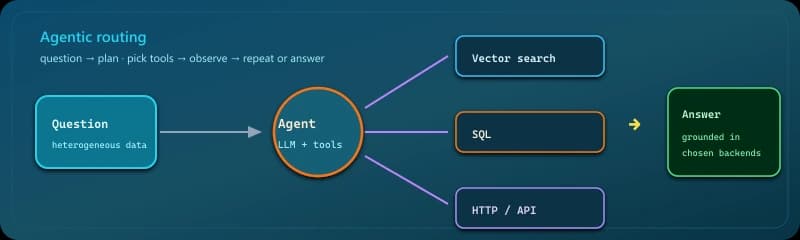
RAGAG - Retrieval-Augmented Generation + Agent
Combines retrieval-augmented generation with agent capabilities — it retrieves relevant context from documents and uses that knowledge to make autonomous decisions and take actions.
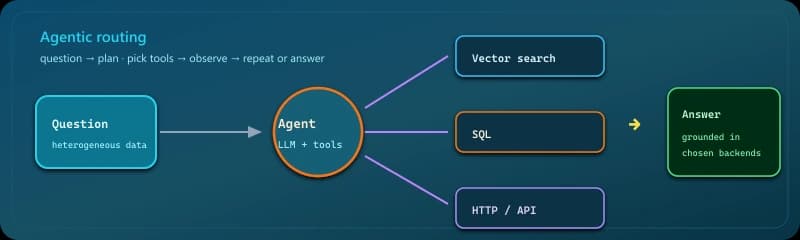
What it does: Exposes multiple retrieval tools (vector DB, SQL, API, file search); an agent chooses which to invoke based on the question.
When to use it: Heterogeneous data — some answers live in PDFs, others in structured tables or live systems.
Example: “How many open P1 incidents last week?” routes to a metrics API or SQL, while “what’s our status-page comms template?” routes to the doc index — one orchestrator, different tools.
Pros: One controller can steer questions to vectors, SQL, HTTP tools, or file search instead of maintaining a separate integration for each path. The planner can chain or mix tools when a single hop is not enough. Fits messy estates where answers are split across systems and formats.
Cons: You own more moving parts: tool contracts, error handling, and safety checks than in a plain retriever pipeline. Behavior shifts with prompts and model mood, so p95 latency and spend are harder to budget than a linear chain. Reasoning plus tool calls stretches wall-clock time versus one-shot retrieval.
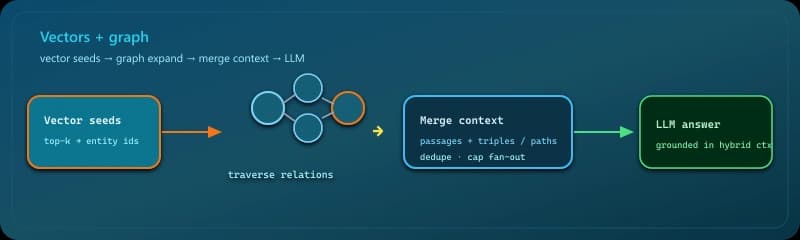
Knowledge graphs
Combines vector search with typed entities and relations so answers can follow dependencies, not only cosine neighbors in embedding space.
What it does: Combines vector search with a graph of entities and relations so you can walk dependencies, not only nearest neighbors in embedding space.
When to use it: Domains where answers are inherently relational — who reports to whom, which drugs interact, which accounts roll up to a parent.
Example: Vector search finds a mention of “Project Aurora”; the graph expands to dependent services and on-call teams so the answer includes blast radius, not one isolated paragraph.
Pros: Dense vectors approximate similarity; typed edges spell out who links to whom or what blocks what — structure plain k-NN can smear. Answers grounded in explicit triples are less likely to invent relationships that aren’t in the data. Strong fit when your domain is a network of entities rather than flat documents.
Cons: You operate a graph database (or equivalent) alongside vectors, plus jobs to load and refresh nodes and edges. Building and maintaining extraction or mapping from raw text to entities is its own product. Queries that fan out along paths cost more wall-clock and engineering than a single ANN lookup, and bad extraction poisons both search and answers.
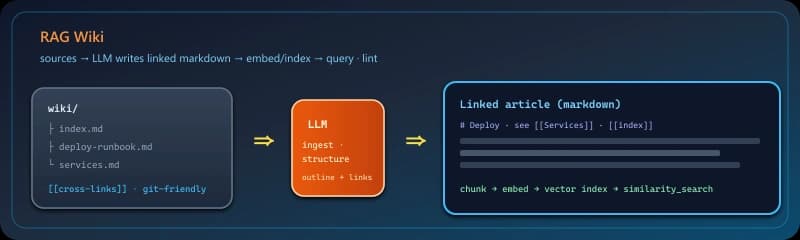
RAG Wiki
An LLM-maintained knowledge base shaped like a small Wikipedia: sources are turned into linked articles on disk (folders + schema), then you query with the usual retrieval stack—plus ingest and periodic lint so structure stays coherent as the corpus grows.
What it does: Treats the corpus as a growing wiki the model helps author: new material becomes interlinked articles (often markdown on disk), not only anonymous chunks. Retrieval still embeds those pages; the difference is persistent structure and navigation the LLM maintains over time.
When to use it: Long-lived internal KBs where you want stable article titles, cross-references, and incremental ingest—not a one-off dump into a vector DB.
Example: A PDF runbook arrives; ingest creates deploy-runbook.md, links it from index.md and related services; the next question hits the right page by similarity plus outline.
Pros: Human-auditable surface (files in git), natural place for lint (broken links, duplicate headings), and clearer provenance than a flat chunk bag.
Cons: More moving parts than “chunk and embed”: schema conventions, merge conflicts on popular pages, and LLM authoring drift—needs review or automated checks like any wiki.
Vectorless RAG
Retrieval-augmented generation that does not rely on dense embedding ANN as the main path: candidates come from lexical search (BM25), structured indexes, metadata filters, JSON records, or LLM navigation over outlines—then the LLM still grounds on fetched text.
What it does: Keeps the RAG shape (retrieve passages, then generate) but makes non-vector retrieval the primary gate: BM25 / full-text, filters on typed fields, hierarchical page indexes, or tool-selected spans—instead of cosine k-NN over chunk embeddings.
When to use it: Exact token matches matter, metadata is rich, embeddings drift on your domain, or you want smaller infra than a GPU embedder plus ANN service for the first pass.
Example: Support KB with SKU and region columns: SQL or keyword hits the right article rows; the LLM never needed a vector shortlist for that query class.
Pros: Predictable lexical behavior, easier debugging (explainable keyword scores), often cheaper cold start than maintaining embedding pipelines for every collection.
Cons: Semantic paraphrases the user did not literalize can miss; you may still add vectors or cross-encoder rerank later as a hybrid—not a reason to skip measurement on your queries.
CAG (Cached Attention Generation)
Caches attention-relevant content (retrieved passages, tool outputs, or prior-turn context) so the model can reuse it on later turns instead of paying for the same retrieval or re-encoding again—cutting cost and latency in long chats or multi-step reasoning.
What it does: Keeps already-fetched or already-encoded material available for the next model step—session-level passage lists, KV-style reuse in supported stacks, or explicit application caches—so you do not repeat identical retrieval or re-embed the same context on every turn.
When to use it: Long conversations that circle the same docs, agent loops that revisit the same tool output, or any workflow where re-querying the index every message wastes money and time.
Example: First turn retrieves three policy chunks; follow-up questions only need the LLM to reread those strings from RAM instead of a second vector search.
Pros: Lower p95 latency and fewer embedding/DB calls when the user stays on one topic; pairs naturally with summarization or windowing so the cache does not grow without bound.
Cons: Stale answers if the corpus updates mid-session; memory pressure on huge caches; wrong early retrieval can poison the whole thread unless you invalidate on topic shift or TTL.
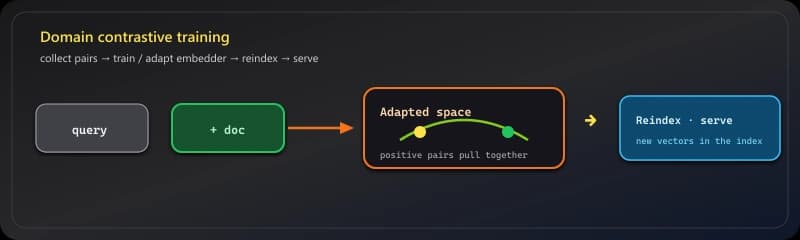
RAFT - Retriecval Augmented Fine-Tuning (Fine-tuned Embeddings)
RAFT stands for Retrieval-Augmented Fine-Tuning. It’s a hybrid training strategy that combines two powerful ideas in LLM optimization: Retrieval-Augmented Generation (RAG) and Fine-tuning (Supervised training of LLMs). Fine-tuning is the process of taking a pre-trained model and making small adjustments to its parameters on a new, often smaller dataset to adapt it to a specific task while retaining the knowledge from the original training.
What it does: Trains or adapts an embedding model on domain query–document pairs (or contrastive pairs from your logs) so the metric matches your users’ language.
When to use it: Specialized vocabularies — clinical notes, legal citations, internal codenames — where off-the-shelf models underperform.
Example: Pairs of (customer ticket subject, resolution article) teach the encoder that “SSO handshake” should sit near your IdP runbook, not generic “handshake” articles.
Pros: Benchmarks and internal evals often show a clear lift once the similarity metric is trained on in-domain positives and negatives — sometimes on the order of a few to low double-digit points, depending on the task. The model picks up terminology, typos, and product names that generic encoders treat as unrelated. A smaller specialized checkpoint can beat a much larger off-the-shelf embedder on your own query logs.
Cons: You need a steady supply of query–passage pairs or reliable weak labels from clicks and tickets. Training consumes GPU time and ML workflow, not just an API call. As products and language shift, embeddings go stale unless you schedule periodic retraining or continual updates.
Self-reflective RAG
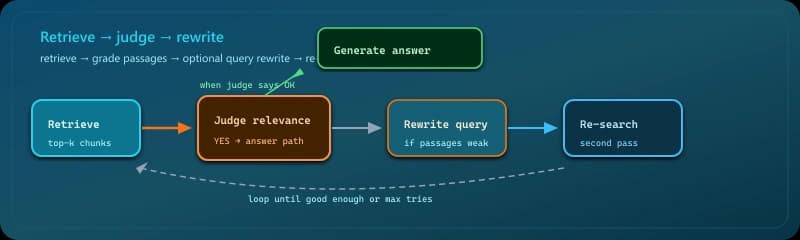
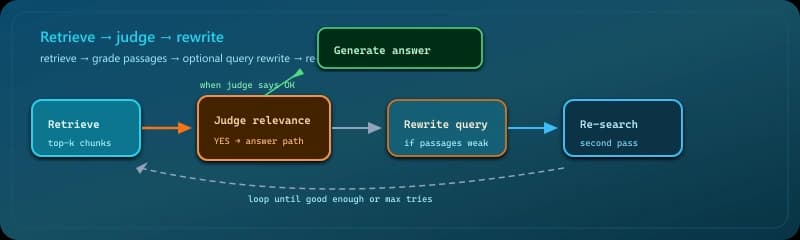
Scores retrieval quality and can rewrite the query and search again before answering—useful when false negatives are costly.
What it does: After an initial retrieval, the system judges relevance; if scores are weak, it rewrites the query and searches again — sometimes iteratively.
When to use it: Research-style or high-accuracy settings where extra latency is acceptable and false negatives are painful.
Example: First pass retrieves only marketing blurbs; the reflector notes missing technical terms, rewrites the query to include the product codename and “API rate limit,” and the second pass lands in engineering docs.
Pros: The system can notice thin or off-topic passages and adjust the search before it commits to an answer, instead of trusting the first hit. Each pass can sharpen the question or the candidate set. A weak initial retrieval is less fatal when a rewrite steers the index toward better ground.
Cons: Relevance checks and query rewrites stack extra model calls on top of retrieval, so end-to-end delay and billable tokens typically exceed simpler pipelines. That overhead buys better odds, not a guarantee — genuinely hard questions or noisy sources can still return junk after several tries.
RAGAS
Retrieval-Augmented Generation Assessment: a metrics toolkit (not a retrieval trick) that scores how well your pipeline performs—typically faithfulness of the answer to retrieved context, relevance of contexts to the question, relevance of the answer to the question, and related measures—often using an LLM as judge on labeled or logged examples.
What it does: Runs offline or batch evaluation on your RAG outputs using reference-free or reference-based scores: common themes include whether the answer is grounded in the retrieved passages (faithfulness), whether those passages match the question (context relevance / precision), and whether the answer addresses the question (answer relevance). Implementations such as the open-source RAGAS library automate these with LLM judges on a table of examples.
When to use it: CI on a golden set, regression tests after prompt or index changes, or sampling production logs—anywhere you need numbers instead of eyeballing answers.
Example: After swapping embedders, average faithfulness drops 8 points on 200 held-out questions—you roll back before the bad model hits prod.
Pros: Comparable scores across releases; catches grounding failures retrieval-only metrics miss; works with the same traces you already log.
Cons: LLM-judge metrics inherit model bias and cost; labels help but are expensive; optimizing the score alone can game short prompts—pair with human spot checks.
Hybrid RAG
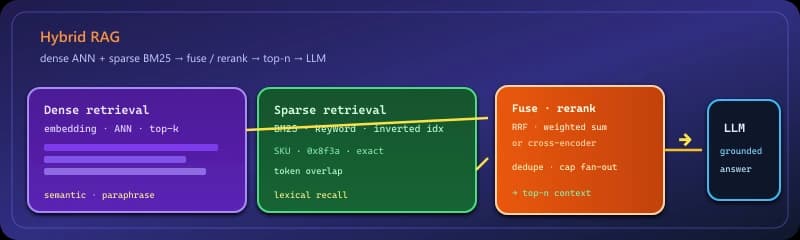
Combines multiple retrieval signals or context strategies in one pipeline—most often dense (embedding ANN) plus sparse (BM25 / keyword), merged or reranked before the LLM. “Hybrid” can also mean pairing vector RAG with graphs, caching (CAG), or other mechanisms so recall and structure both improve.
What it does: Runs more than one retrieval path (or retrieval plus another context source) and combines results before generation. The common case is dense + sparse: embedding similarity for paraphrase coverage and BM25-style keyword hits for exact tokens—merged by score, reciprocal rank fusion, or a cross-encoder reranker.
When to use it: Production search where either channel alone misses—codes, SKUs, product names need lexical hits; user questions need semantic overlap—or when you also want graph edges or cached passages in the same stack.
Example: “Error 0x8f3a” matches sparse; “deployment keeps failing” matches dense; fusion surfaces both the KB article and the runbook paragraph.
Pros: Higher recall than pure vectors on mixed query styles; you can tune weights or rerank instead of betting on one scorer.
Cons: Two indexes to maintain, higher query cost, and merge logic to test—bad fusion can still bury the right doc if ranks disagree.
Stacked combinations
Teams rarely deploy all twenty-two. Three stacks recur: production-ready (semantic chunking + re-ranking + query expansion + agentic tool choice), high-accuracy (contextual retrieval + multi-query + re-ranking + self-reflective loops), and domain expert (fine-tuned embeddings + contextual retrieval + knowledge graphs + re-ranking). Names describe intent — tune for your latency and cost envelope.
🔥 Production-ready stack: Fast baseline with good precision: structure-aware chunks, expand vague queries, rerank the candidate pool, let an agent pick the right backend when you have more than one index.
Production-ready stack
Performance: 92% accuracy, 1.2s average latency
Cost: $0 marginal per query at inference if you self-host open weights (e.g. sentence-transformers/all-MiniLM-L6-v2, BAAI/bge-reranker-large, Qwen2.5-7B-Instruct)—you pay electricity / GPU only. Illustrative ~$0.003/query with a typical API mix: gpt-6-luna (expand + agent) + text-embedding-3-small (chunk search)—check live vendor pricing.
Best for: General-purpose production systems, customer support, internal knowledge bases
🔥 High-accuracy stack: When mistakes are expensive: rich chunk context, multiple query phrasings, reranker, and a reflection loop before answering.
High-accuracy stack
Performance: 96% accuracy, 2.5s average latency
Cost: $0 marginal per query at inference when you self-host (e.g. DeepSeek-R1-Distill-Qwen-32B or Qwen2.5-72B-Instruct for stuffing / reflection, bge-reranker-large, local embeddings). Illustrative ~$0.008/query with APIs: gpt-6.1-sol / gpt-6-luna (context + multi-query + judge loops) + text-embedding-3-large—multi-call stacks add up; verify pricing.
Best for: Medical, legal, financial applications where errors are costly
🔥 Domain expert stack: When generic embeddings and flat text search hit a ceiling: teach the metric with pairs, keep contextual prefixes, add graphs for relational questions, rerank everything that reaches the LLM.
Domain expert stack
Performance: 94% accuracy for domain queries, 1.8s latency
Cost: After fine-tune, $0 embedding inference on your hardware (e.g. adapted all-MiniLM-L6-v2 checkpoint); training is a one-time GPU cost, not per query. Illustrative ~$0.005/query with hosted APIs: gpt-6-luna (generation) + text-embedding-3-small + graph / rerank services—model line items determine the bill.
Best for: Medical, legal, financial, technical domains with specialized terminology
Common mistakes
- 🔥 Turning every knob at once — unmaintainable pipelines and no idea what helped. Start with semantic chunking + measurement; add reranking and expansion before exotic loops.
- 🔥 No baseline metrics — without labeled questions or human grades, “better” is subjective. Track answer correctness (or groundedness) and p95 latency per release.
- 🔥 Fixed-size-only chunking — cheap to implement but fragments meaning. Prefer structure-aware splitting first.
- 🔥 Skipping re-ranking — vector similarity is a proxy for relevance; a reranker is often the best ROI after decent chunking.
- 🔥 Raw queries only — if users don’t write like your docs, add expansion or synonym handling at minimum.
- 🔥 One retrieval path for every question — a single index and tool rarely fits; agentic routing or explicit query classification reduces forced errors.
Conclusion
Effective RAG is compositional: chunking and embeddings define what is searchable, retrieval and reranking decide what is relevant, and query formulation and orchestration connect user intent to those pieces. Add complexity when measurements justify it — not because a checklist has twenty-two patterns.
References
LangChain — Retrievals
LangChain docs — Retrieval concepts
YouTube — Every RAG Strategy Explained in 13 Minutes
Towards AI — Building RAG systems: eleven patterns (supplementary read)